Store Inventory
Stay in control of store inventory
Accurate store inventory is better for your store managers and better for your entire network. Real-time accurate data on what’s available to sell and available to promise increases online conversions and reduce in-store markdowns.

Accurate store inventory unlocks revenue and margin across all of your channels
Improve store inventory accuracy
Perform cycle counts and inventory adjustments using mobile tools to enable store associates to correct stock discrepancies in real time, directly from the shop floor. By empowering teams to record damaged goods, theft, or administrative errors immediately, you maintain continuous inventory accuracy, prevent phantom stock issues, and ensure every item shown online is actually available for fulfillment.
Reduce order cancellations
Connect store inventory to store fulfillment workflows in order to automatically triggering reallocations when stock discrepancies are declared. This intelligent connection ensures orders are never cancelled due to inventory errors, protecting revenue and customer trust while driving higher conversion rates across all channels.
Manage store operations in a single app
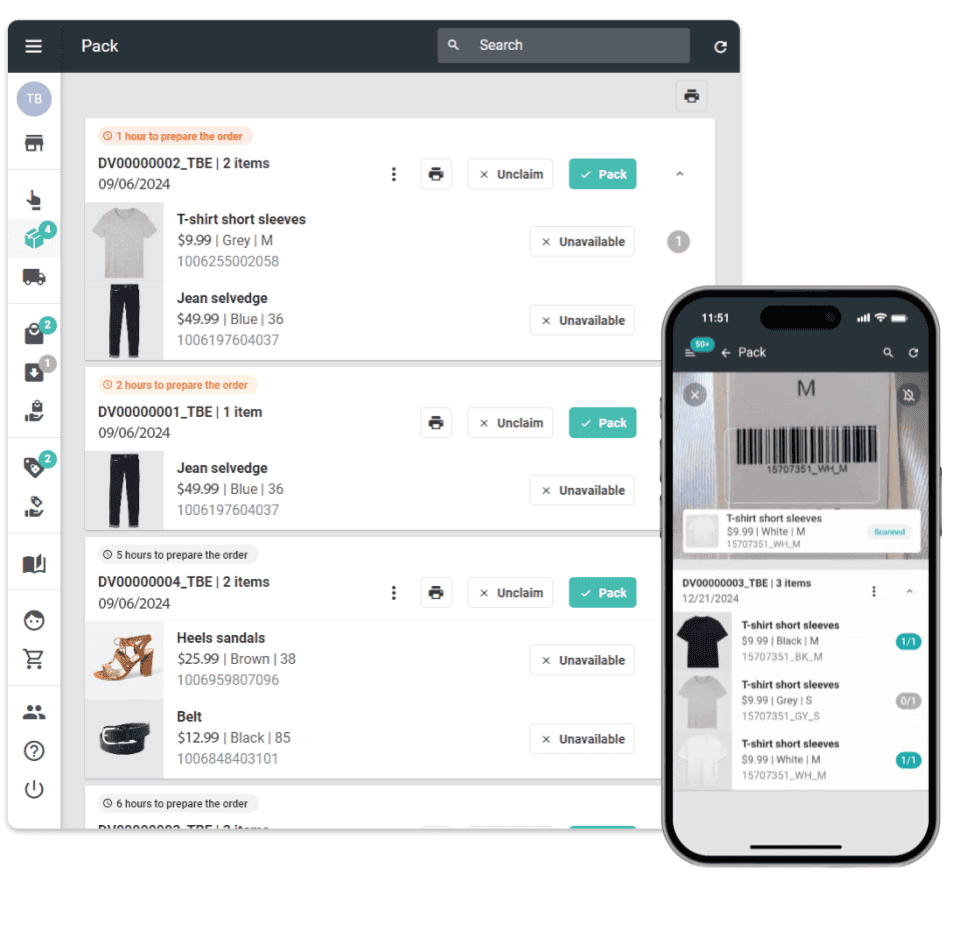
Consolidate inventory transfers, adjustments, cycle counts, and fulfillment into a single, intuitive store application. Store teams manage all backroom operations from one mobile interface, eliminating the need for multiple disconnected systems.
Simplify your architecture
Replace fragmented inventory tools with a unified, enterprise-grade platform that integrates seamlessly with your existing ERP, WMS, and ecommerce systems. By centralizing store inventory management within your Order Management System, you reduce technical debt, lower integration costs, and accelerate time-to-market for new omnichannel capabilities while maintaining full visibility and control.







Enable your stores to play their part in your unified real-time inventory strategy
Maintain an accurate picture of inventory in all stores and manage transfers, updates and adjustments all in one place. Full integration to your network provides a genuine unified view of inventory and powers the industry’s leading promise engine.
Manage store inventory transfers
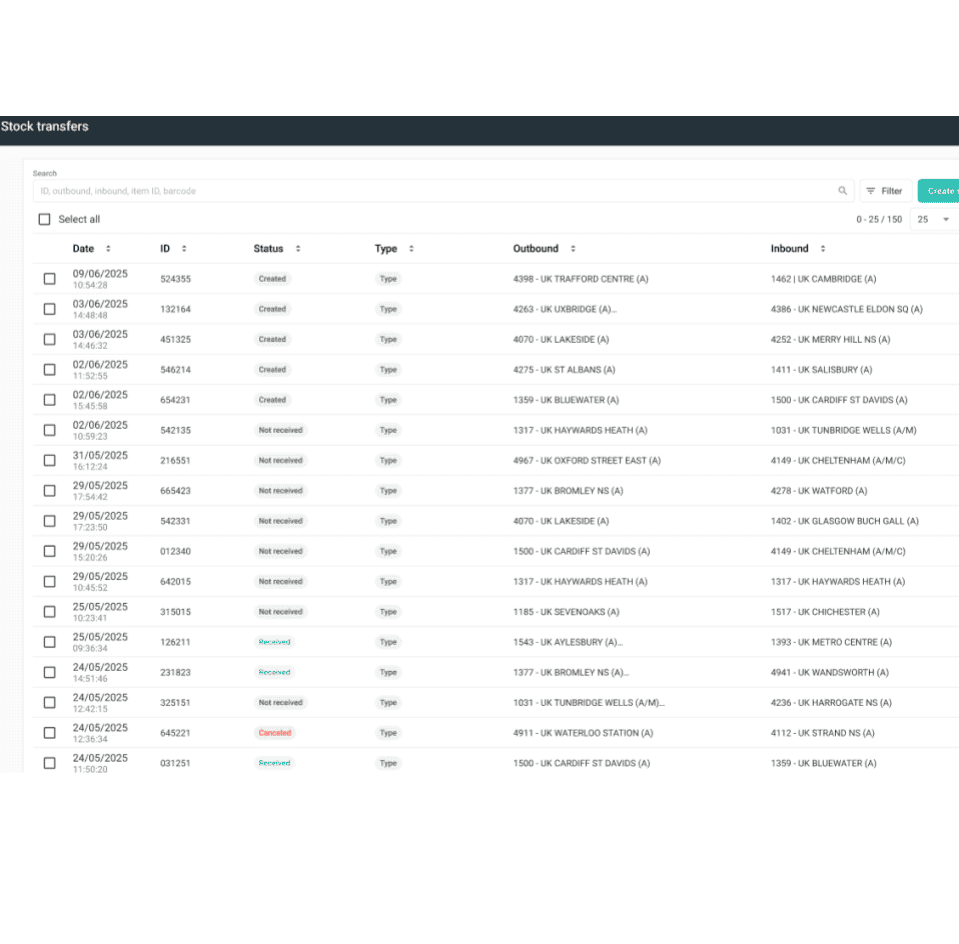
Enable flexible stock movement to your store with OneStock’s Store Inventory Transfer . Transfers can be requested via the OneStock admin software or directly from the Store App, either manually or through bulk file imports, providing complete flexibility for your replenishment strategies.
Store inventory adjustments
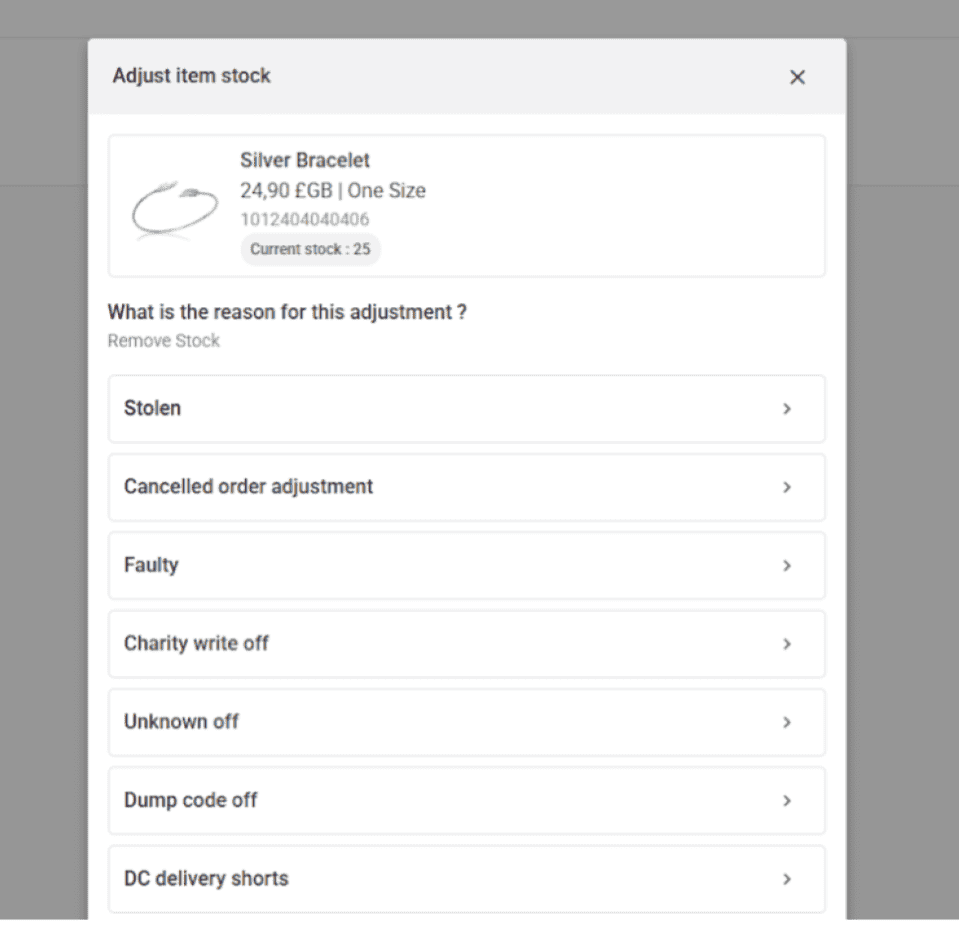
OneStock helps your teams keep up to date with real-time inventory adjustments made directly in the mobile app. Associates record stock changes in real-time from the shop floor, ensuring online availability reflects physical reality and preventing customer disappointment.
Store inventory counts
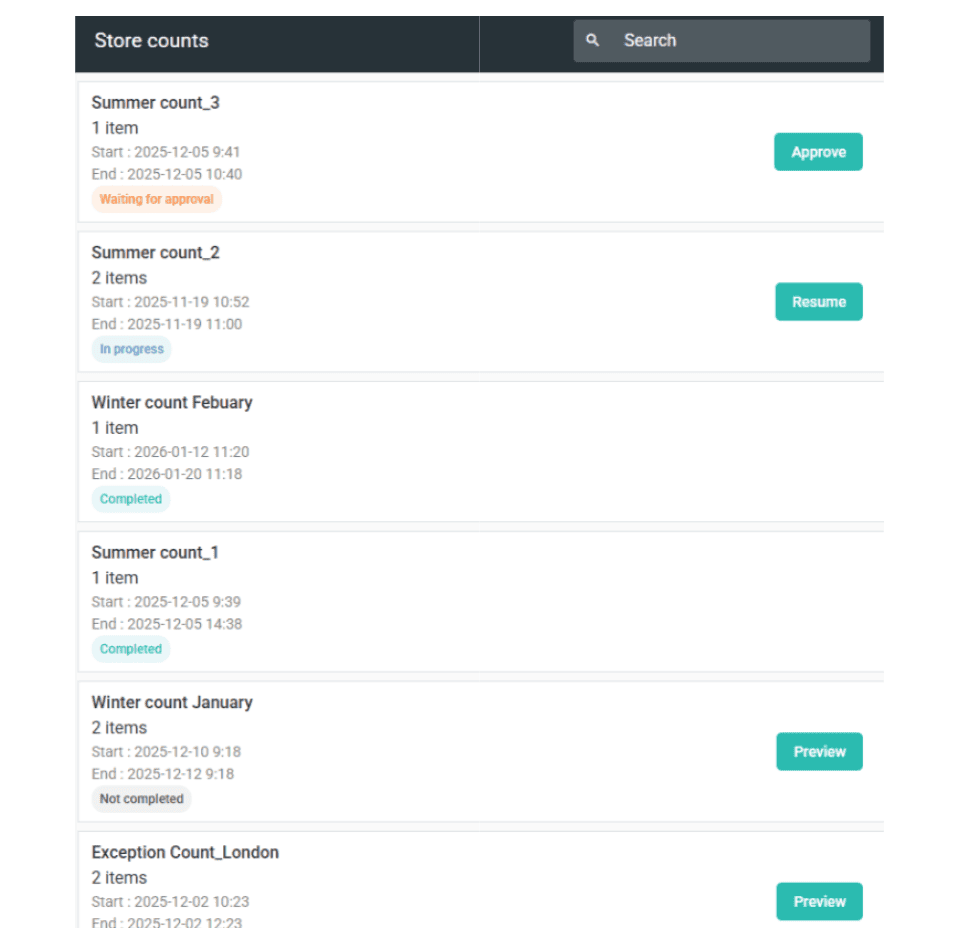
Streamline inventory accuracy with the Onestock application without the disruption of full physical inventory counts. OneStock’s Store Inventory Count application enables configurable audit campaigns focused on specific product categories, high-risk items, or seasonal preparations.
Connected to store fulfillment
OneStock’s store inventory management is natively integrated with store fulfillment capabilities, ensuring that inventory accuracy directly supports order execution. This connection eliminates the gap between inventory records and fulfillment reality, reducing cancellations and improving customer satisfaction.
Store inventory use cases
High-shrinkage category control
Fashion and luxury retailers can face significant inventory losses in categories such as jewelry and high-value accessories. OneStock enables targeted inventory counting campaigns on these high-risk categories, with mobile-guided instructions that makes frequent audits fast and non-disruptive. Store associates receive proactive count proposals when fulfillment issues arise, allowing teams to identify shrinkage sources quickly and maintain tight control without disrupting store operations.
Seasonal stock preparation
Before peak demand periods, retailers need confidence in inventory accuracy across seasonal categories. OneStock allows operations teams to launch targeted counting campaigns for specific product lines, such as swimwear before summer or outerwear before winter, ensuring availability is accurate when customer demand surges. This prevents stockouts during critical selling periods and reduces order cancellations that damage conversion rates and customer trust.
Balance stock between stores
Getting the right distribution of inventory across multiple stores is a continuous challenge. High-traffic flagship stores can run out of popular sizes while smaller locations have plenty of inventory for the same items. OneStock's Store Inventory Transfer application enables store managers and planners to move stock between locations quickly, avoiding markdowns on slow-moving items while capturing sales in high-demand stores. Full traceability ensures compliance and visibility for auditing requirements.
Real-time damage and theft recording
Every day, store associates discover damaged items on racks, empty hangers, or administrative discrepancies that create phantom stock. OneStock empowers associates to record these adjustments immediately via the mobile app, with detailed reason codes that help retailers track distinct shrinkage causes. Proactive adjustment proposals consolidate daily issues, streamlining validation workflows and ensuring online availability always reflects physical reality.
How it works
Configure
Configure targeted inventory campaigns or transfer rules based on product categories, store locations, or business priorities.
Notify
Store associates receive mobile notifications for physical inventory count tasks, inventory adjustment proposals, or transfer requests directly in the OneStock Store App.
Execute
Associates performs the counts, adjustments, or transfers using mobile-guided workflows with barcode scanning, ensuring accuracy and speed without disrupting customer-facing activities.
Synchronize
Real-time updates immediately synchronize inventory changes to unified inventory, delivery promise calculations, and orchestration rules across all sales channels.
Monitor
Back Office teams monitor performance through comprehensive audit trails, historical logs, and exception reports to continuously improve inventory accuracy and operational efficiency.
How does store inventory management reduce order cancellations?
OneStock connects inventory accuracy directly to fulfillment execution. When store associates declare stock discrepancies through the mobile app, the system automatically triggers order reallocation to alternative locations. This prevents cancellations due to phantom stock, protects revenue, and maintains customer trust. Petit Bateau achieved a near-zero order cancellation rate using OneStock’s intelligent orchestration connected to store inventory reliability.
What is cycle counting and how does it improve inventory accuracy?
Targeted physical inventory counts, sometimes known as cycle counting, is a method of checking inventory accuracy by counting a small, scheduled subset of SKUs without stopping operations. OneStock enables targeted cycle counting campaigns focused on high-value items, high-shrinkage categories, or seasonal products. Store associates peform the counts via mobile-guided workflows with real-time updates, improving accuracy without the disruption of full inventory counts (stock-takes). Studies show fixing inventory record inaccuracy can increase sales by 4-8%.
Can store associates perform inventory adjustments in real-time?
Yes. OneStock’s mobile-first Store Inventory Adjustment application means associates can record stock changes in real-time directly from the shop floor. Whether handling damaged goods, theft, or administrative errors, associates use granular reason codes to track distinct issues. The system consolidates daily inventory issues and actively proposes adjustments for validation, streamlining exception treatment and ensuring perpetual inventory accuracy.
How do inventory transfers work between stores and warehouses?
OneStock’s Store Inventory Transfer application allows transfers to be requested via the admins application (back office) or directly from the Store App, either manually or through bulk file imports. Once created, requests are automatically routed to the correct fulfilling location (DC or store), where staff manage picking and shipping directly within the mobile app. Full historical logs are maintained in the Back Office for complete traceability and auditing.
Does store inventory management integrate with existing systems?
Yes. OneStock integrates seamlessly with existing ERP, WMS, POS, and ecommerce platforms through enterprise-grade APIs, webhooks, and connectors. Inventory adjustments, counts, and transfers synchronize in real-time with your existing systems, ensuring a single source of truth. This architecture simplification reduces technical debt, lowers integration costs, and accelerates deployment of new omnichannel capabilities while maintaining full visibility and control.
Discover how to use OneStock Store application to increase the inventory accuracy
By business model
By Scenario









Learn how retailers increase availability, streamline fulfilment and grow with OneStock.