Commerce never stands still. Grappling with the challenges of a new marketplace, a new delivery option, a new carrier, a new country, or a new payment partner is a continual process. Every one of these will change how orders need to be captured, routed and fulfilled. For many merchants, each of the changes also becomes an IT project, and after a few years of workarounds the conversation turns to replacing the whole platform.
This cycle raises an interesting question. How do you keep your order management in step with the business without rebuilding it every few years? One of the most effective approaches is to choose a platform that can be configured and extended, rather than one that has to be customized. Business teams should be able to change rules themselves, new systems should plug in without needing to touch the core, and new capabilities should arrive in stages rather than all at once.
In its 2026 Magic Quadrant™ for Distributed Order Management, Gartner® notes “too often, companies invest in DOMs with features they hope to use but never do, while core pain points, such as inventory visibility, speed of change and improved customer experience, are not fully vetted.”[1]
Why rigid order management gets expensive
Every change becomes a project
When routing rules, delivery methods or fulfillment workflows are hard-coded, even small business decisions need developer time. Launching Ship from Store in a new region, for example, adding a carrier or changing how orders are split can all sit in the IT backlog for months. Meanwhile, the business either waits or is forced to build manual workarounds that are prone to human error or otherwise inefficient.
Customization makes every upgrade harder
Heavily customized platforms carry a hidden cost that many retailers will recognize. Every upgrade carries the high risk that something will break. Because of this, teams may start to avoid upgrades wherever possible, with the added effect that they fall behind on new features and end up maintaining their own version of the software. This is one of the hidden costs of building your own retail OMS, and it applies just as much to over-customized packages.
The re-platforming trap
Major technology projects, especially those involving the ERP, often trigger a wider rethink of order management. But the ERP and the order management system do different jobs, so frequently the order management aspect is delayed. This approach, however, adds to the risk. Our guide to ERP replatforming vs. distributed order management looks at where retailers should invest first.
Configure first, extend second
Put the rules in the hands of the business
The people who best understand the mechanics of successful fulfillment are usually in operations, ecommerce and stores, not IT. A modern OMS should allow them, as the experts, to adjust routing priorities, delivery options and workflows through configuration, as well as being able to test the impact and roll out changes without a development cycle.
Extend without touching the core
Some needs are specific to your business, and configuration alone won’t cover them. The answer in this case lies in extension points that sit around a stable core, so your additions survive upgrades.
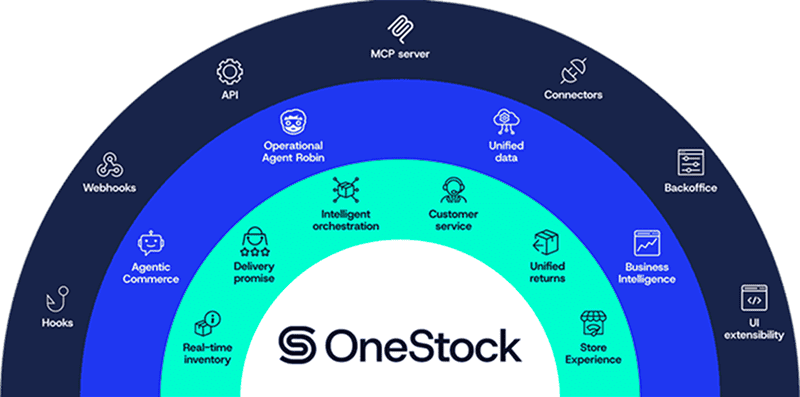
To this end, OneStock’s extensibility framework is built on four pillars:
- Data extensibility: add your own fields to orders, products, customer records and stock, so business-specific information flows through the platform and its APIs.
- UI extensibility: add new actions, menu entries and data blocks to the back office and customer service tools, consistent with the OneStock design system.
- Connector extensibility: connect carriers, payment providers, CRM and promotion engines, so stores and customer service use the same prices and customer data as every other channel.
- Core extensibility: feed external signals, such as real-time carrier capacity and pickup times, into promise and routing decisions.
Connect to the wider ecosystem
Order management sits between sales channels, stores, warehouses, carriers and finance systems. APIs, webhooks and an MCP server for AI agents mean new channels and partners can be connected as the business grows, rather than designed in from day one.
Start small and add value in stages
You do not need to switch everything on at once. Many retailers start with one capability, such as unified inventory, Click & Collect or Ship from Store, prove the value, then expand from there. A staged approach brings earlier returns, lowers risk and lets teams learn as they go.
Rebuild vs. adapt
| Rebuild | Adapt | |
|---|---|---|
| Time to change | Months, often tied to a release cycle | Days or weeks, through configuration |
| Who makes the change | IT and external developers | Business teams, with IT for extensions |
| Upgrade impact | Customizations break or block upgrades | Extensions sit outside the core and survive upgrades |
| Rollout | Big-bang program | Staged, in phases |
| Risk | Concentrated in one go-live | Spread across smaller, reversible steps |
Does this apply to you?
- Simple routing or delivery rule changes need a developer.
- You have put off upgrades because of custom code.
- New channels, carriers or partners take months to connect.
- Store and customer service teams rely on workarounds outside the OMS.
- An ERP or commerce platform migration is prompting talk of rebuilding wider parts of the technology stack.
What adapting looks like in practice
Staged, configuration-led rollouts can deliver value quickly. Orlebar Brown unified its global inventory in two weeks, and Bizzbee launched Ship from Store and Click & Collect in 45 days. Both started with a focused scope and built from there.
Conclusion: build once, keep adapting
The question is no longer whether your order management will need to change, but how often and how fast. A platform that business teams can configure, that extends without custom code in the core and that grows in stages lets you respond to the market without starting over. It is also what makes other ambitions possible: a promise you can keep depends on an operation that can adapt as conditions change.
FAQs
What is OMS extensibility?
It is the ability to add data, screens, connectors and business logic to an order management system without changing its core code. Extensions survive upgrades, so the platform stays current.
What is the difference between configuration and customization?
Configuration changes how the platform behaves using built-in settings and rules. Customization changes the code itself. Configuration is faster and safer; customization tends to make upgrades harder.
Do I need to replace my ERP to modernize order management?
No. A distributed order management system can sit alongside your existing ERP and take over orchestration, inventory visibility and promising, so you can modernize the customer-facing side without waiting for an ERP project.
How long does a phased OMS rollout take?
It depends on the scope of the first phase. Retailers that start with a focused capability, such as unified inventory or Click & Collect, can go live in weeks, then add further capabilities over time.
[1] Source: Gartner, Magic Quadrant for Distributed Order Management, Chap Achen, Max Panther Hammond, Oscar Sanchez Duran, 12 November 2026. GARTNER and MAGIC QUADRANT are trademarks of Gartner, Inc. and/or its affiliates.